
QuickBar Pro Logo QuickBar
โšก AFTER EFFECTS PLUGIN 143 TOTAL FEATURES AE CC 2020 โ€“ 2026

QuickBar Pro

143+ Power Tools in One Ultra-Fast HUD Panel for Motion Designers & Video Editors.

Fuzzy Command Launcher, Chroma Palette Studio, 9-Point Anchor Matrix, Bezier Easing Curves, FX Vault, Multi-Platform Social Auto-Reframe, OnlyComp Asset Stash, and AI Magic Macros โ€” all engineered into one lightweight panel.
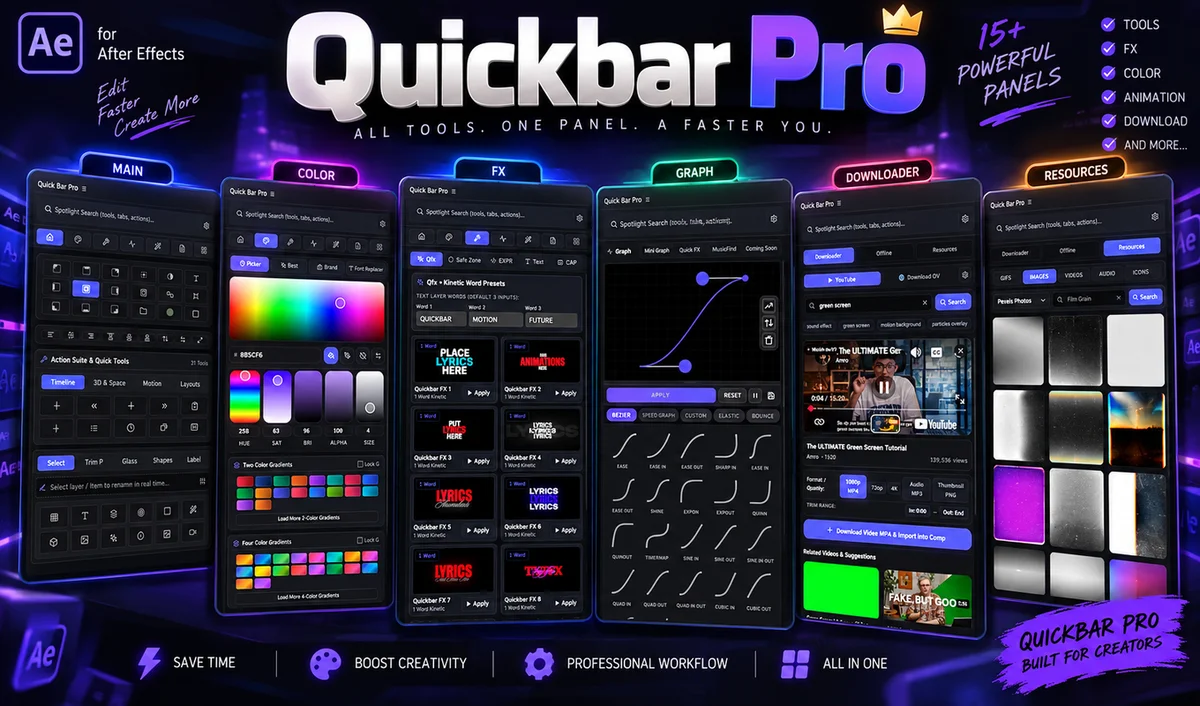
QuickBar Pro In-App Panel Interface Showcase
01 Command Launcher HUD
FULL PRO LICENSE 100% ONE-TIME BUY
โ‚น89 โ‚น999 91% OFF

LAUNCH PRICE ENDS SOON โ€ข INSTANT KEY DELIVERY

  • โœ“ All 143 Power Features Across 8 Main Tabs
  • โœ“ Disk-Backed OnlyComp Asset Stash (Fonts, JSX, FFX)
  • โœ“ Social Multi-Platform Auto-Reframe (9:16, 1:1, 4:5, 16:9)
  • โœ“ Commercial License & Free Lifetime Updates
Instant Razorpay Checkout โ€ข Download Immediately

Delivered by email within a few seconds of purchase.

Already bought? Resend my key ยท Manage license

AI GENERATIVE ENGINE & SEARCH COMPATIBLE

Engineered for Next-Gen AI Workflows

QuickBar Pro integrates AI Magic Macros and script automation designed to pair seamlessly with top AI models. Click any tool to visit its official platform:

๐Ÿ† COMPLETE 143 FEATURE BREAKDOWN

8 Powerful Engines. 143 Total Features.

Click any tab below to inspect the dedicated tools engineered into each sub-module of QuickBar Pro.

1

Home Tab โ€” Command Launcher & Workspace Engine

12 Dedicated Features

Fuzzy Search Command Palette

Instant query bar to search across presets, effects, tools, scripts, and commands with zero latency.

Pinned Quick-Action Favorites

Customizable fast-access button row for your most frequently used everyday motion tools.

Recent Actions History

Real-time stack tracking your last 10 executed actions with 1-click re-run capability.

Active Comp Resolution Switcher

Instant switching between Full, Half, Third, and Quarter preview resolutions.

Memory & Cache Purger

Deep RAM memory purge + Disk Cache cleanup in 1-click to eliminate playback stutters.

Zero Transformation Reset

Resets Position, Scale, Rotation, and Opacity to default resting states without moving visual box.

Center Anchor Point to Layer

Snaps anchor point to the exact mathematical center of any shape, text, or footage layer.

Center Layer to Composition

Instantly aligns any layer's center to the comp frame center ([width/2, height/2]).

Solo Selected / Invert Solo

1-click isolate selected layers or toggle inverse isolation for focused editing.

Lock / Unlock All Unselected

Protects complex background or locked elements while editing active elements.

Fit Comp to Viewer

Instantly frames the composition viewport to fit 100% of the active panel dimensions.

Playhead Snapping & Jump

Jump playhead to in-point, out-point, or next keyframe cluster with 1 click.

2

Colors Tab โ€” Chroma Engine & Palette Studio

16 Dedicated Features

Live Palette Generator

Dynamic color swatches with HEX, RGB, and HSL values.

Color Harmony Modes

5 harmonies (Analogous, Mono, Triadic, Comp, Split-Comp).

Eyedropper Sampler

Direct viewport and desktop color sampler with swatch preview.

1-Click Solid Recolor

Recolors solids directly without duplicate project items.

Shape Fill & Stroke

Detects shape groups deeply to apply fills and strokes.

Text Character Recolor

Updates text fill & stroke color across selected text layers.

CC Toner Mapping

Auto-injects CC Toner with 3-tone or 5-tone mapped colors.

Gradient Presets

20+ designer gradients (Cyberpunk, Sunset, Holographic).

Linear/Radial Generator

Creates shape gradient fills with editable start/end position controllers.

Global Master Color Linker

Generates Master Null with color sliders linked via expressions.

Live Color Shift

Real-time slider to shift entire color temp (Hue/Sat/Light).

Palette Importer

Import swatches from Adobe Swatch Exchange (ASE) or JSON.

Export Palette

Copy clean JSON/HEX arrays for web or brand design handoff.

Invert Palette

Inverts active color channels for high-contrast testing.

Randomize Assignment

Shuffles palette colors across selected layers for variety.

Contrast Checker

Evaluates text contrast ratios for WCAG compliance.

3

Tools Tab โ€” Motion Engineering & Transform Matrix

24 Dedicated Features

9-Point Anchor MatrixInteractive 3x3 grid to snap anchor points to any corner or center without shifting visual positions.
Comp Center AnchorSnaps anchor point to mathematical comp center.
Align to Comp MatrixAlign Left, Center, Right, Top, Middle, Bottom to comp bounds.
Align to Selection MatrixAlign layers relative to primary selected leader layer.
Distribute Horizontal SpacingEqualizes pixel gaps between layers horizontally.
Distribute Vertical SpacingEqualizes pixel gaps between layers vertically.
Grid Auto-Layout ArrangerArranges layers into custom N-column x M-row grid.
Layer Time StaggerShifts layer in-points by custom frames or seconds.
Reverse Layer SequenceInverts timeline stacking or in-point order of layers.
Trim Layer to PlayheadTrims start or end points to CTI in 1 click.
Auto-Crop Comp to ContentsShrinks composition canvas tightly around active layer masks.
Smart PrecomposePrecomposes with option to leave/move all attributes.
Deep Precomp ClonerDuplicates precomp AND all nested precomps recursively.
Batch Layer RenamerAdvanced string renamer with Prefix, Suffix, Numbering (#01).
Chain Parenting GeneratorParents layers in sequential cascade (3 -> 2 -> 1).
Master Null Controller RigCreates centered Null and parents selected layers.
Unparent & Maintain VisualsUnparents layers while compensating spatial coordinates.
3D Layer Batch SwitcherToggles 3D status across selected layers simultaneously.
Orbit Camera Rig GeneratorCreates 2-node Camera + Orbit Controller Null with sliders.
Target Light Rig GeneratorInjects Spot/Point lights with target tracking nulls.
3D Gimbal Null RigCreates 3-axis independent rotation null controllers.
Guide Layer ToggleConverts selected layers into non-rendering guide layers.
Adjustment Layer InjectorAdds new top adjustment layer trimmed to active comp.
Solid Color GeneratorFast solid creation modal with custom dimensions.
4

Graph Tab โ€” Keyframe Physics & Curve Studio

22 Dedicated Features

Visual Ease Curve Presets (30+)Exponential Ease, Cubic Ease, Snappy (70/30, 80/20, 90/10), Overshoot & Elastic.
Interactive Speed Graph SliderDual-handle slider to adjust Speed & Influence (0-100%) with live SVG visualizer.
Linear Keyframe ResetConverts bezier keyframes to pure linear interpolation.
Hold Keyframe ToggleConverts keyframes to Hold keyframes for stop-motion.
Auto-Bezier SmootherSmooths out jagged spatial or temporal keyframe velocities.
Inertial Bounce InjectorWrites bounce physics to Position, Scale, or Rotation with Freq, Decay, Amp sliders.
Elastic Spring RigInjects harmonic spring oscillation physics to any keyframed property.
Wiggle Rig GeneratorAdds customizable 2D/3D wiggle expression linked to master null sliders.
Copy Easing VelocityCopies bezier handle speed and influence values from property.
Paste Easing VelocityPastes copied ease curves across multiple layers simultaneously.
Reverse Keyframe SequenceInverts timing order of selected keyframes.
Invert Keyframe VelocityFlips ease curves so ease-in becomes ease-out.
Keyframe Space MultiplierExpands or compresses time duration between keyframes proportionally.
Align Keyframe PeaksSynchronizes maximum velocity peaks across properties.
Bake Expressions to KeysConverts active expressions into raw keyframes on every frame.
Remove All ExpressionsClears expressions from selected properties cleanly.
Loop In / Out Generator1-click injection of loopOut("cycle"), loopOut("pingpong"), and loopOut("continue").
Time-Remap LooperEnables time remapping and sets up seamless video loop expressions.
Velocity NormalizerEqualizes incoming and outgoing speed vectors across motion paths.
Scale Keyframe ValuesMultiplies numerical keyframe values by custom percentage factors.
Quantize KeyframesSnaps sub-frame keyframes onto exact integer frame ticks.
Keyframe Color LabelerColor-codes keyframes for complex visual timeline organization.
5

FX Tab โ€” Plugin Accelerator & Visual FX Vault

18 Dedicated Features

Universal FX Search EngineReal-time search across native Adobe effects and 3rd party plugins (Sapphire, Red Giant, Trapcode, Boris FX).
Fast Gaussian Blur RigQuick injection of optimized gaussian/box blur with repeat edge pixels.
Drop Shadow StudioInjects soft natural drop shadows with distance, blur, and opacity presets.
Deep Glow / Optical GlowApplies rich filmic glow chains with chromatic aberration falloff.
Turbulent Displace RigApplies animated turbulent displace with auto-evolving time expressions.
Optics CompensationInjects reverse lens distortion for warp zoom transitions.
CC Light Sweep BeamAdds interactive animated light sweep highlights across text or logos.
Cinematic Curves & LevelsInjects high-contrast curves with S-curve color grade presets.
Colorama Gradient MapApplies vibrant chromatic color mapping presets to grayscale elements.
Unsharp Mask & SharpenCrisp edge enhancement for rendered 3D elements or footage.
Film Grain & TextureCreates procedural 35mm / 16mm film grain overlay layers.
CRT / VHS Retro FX Chain1-click adjustment layer with scanlines, chromatic aberration, and tape distortion.
Bloom & Highlight DiffusionSoft diffusion filter simulating vintage anamorphic lenses.
Master FX Controller LinkerLinks matching effect parameters across 10+ layers to a single slider.
Disable All Effects in CompToggles all effect switches off for instant real-time playback testing.
Enable All Effects in CompRestores all disabled effect switches in 1 click.
Remove Broken EffectsScans project and removes uninstalled or corrupted 3rd party effect instances.
Remove Disabled EffectsCleans up unused inactive effects to optimize render speed.
6

Notes Tab โ€” Production Workflow & Socially Auto-Reframe

19 Dedicated Features

๐Ÿš€ Socially Multi-Platform Auto-Reframe (BETA VERSION)

Auto-generate 6 target aspect ratio compositions instantly from 1 master composition: 9:16 Vertical (1080ร—1920), 1:1 Square (1080ร—1080), 4:5 Portrait (1080ร—1350), 16:9 Landscape (1920ร—1080), 1.91:1 Banner (1200ร—628), and 2:3 Tall (1000ร—1500). Includes Smart Auto-Center, Cover & Fill, Letterbox Fit, Master Null Anchor, and locked safe-zone guides for TikTok/Reels UI!

Timestamped NotesCreate rich text notes with automatic date and time tagging.
Timeline Playhead InsertionGrabs playhead timecode (00:01:24:12) and inserts directly into note content.
Category TaggingOrganize notes by To-Do, Client Feedback, Revision, Ideas, or Scripts.
Search & Filter NotesFilter notes by keyword, category, or creation date.
Pin Important NotesKeep critical client instructions pinned to top of list.
Export Notes to MarkdownQuick export of all notes for email or Slack updates.
Interactive Task ChecklistAdd, edit, check off, and delete production tasks.
Priority Rating BadgesAssign High, Medium, or Low priority badges to tasks.
Visual Progress BarReal-time percentage calculation of completed vs. remaining tasks.
Smart Auto-Center AdaptationOffsets position vectors while preserving keyframe animations.
Cover & Fill AdaptationProportional center-scaling for 100% full-frame coverage.
Letterbox Fit AdaptationProportional scale-to-fit mode showing 100% of comp without cropping.
Platform Safe Zone GuidesCreates locked, non-rendering guide layers customized for TikTok/Reels UI buttons.
1-Click Folder OrganizationGroups generated social comps into [Comp Name] - Social Versions.
Add to Render QueueAutomatically queues all generated social compositions with 1 click.
7

All Tab โ€” OnlyComp Asset Stash & Comp Dependency Tree

17 Dedicated Features

Disk-Backed Storage EngineSyncs saved assets to AppData/Roaming/QuickBarPro across AE restarts.
1-Click Font Library StashSave favorite fonts with live typography previews and apply in 1 click.
JSX Script Vault & RunnerSave custom .jsx scripts to disk and run them instantly from QuickBar UI.
JSXBIN Binary Script RunnerFull support for protected binary .jsxbin ExtendScript tools.
FFX Preset StashDrag & drop .ffx animation presets and apply directly to active layers.
Grid / List View SwitcherToggle between compact list view and visual grid cards for assets.
Asset Search & Tag FilterInstant search across saved fonts, scripts, and animation presets.
Asset Import / Export BackupBackup and restore entire asset library across different workstations.
Hierarchical Comp TreeVisualizes precomp dependencies throughout the entire project.
Nested Precomp Depth MappingDeep recursion showing multi-level nesting (Master -> Scene -> Assets).
Asset Usage CounterTells you precisely how many compositions use a selected asset.
Unused Asset DetectorIdentifies orphan assets and unused precomps to safely clean bloated files.
8

Magic Tab โ€” Automation, C3D & AI Expressions

15 Dedicated Features

SS to Layer (Screenshot to Layer)Paste any screenshot from clipboard directly into AE comp as a cropped layer.
Auto-Crop Image BoundsDetects content bounds and crops away transparent/white margins automatically.
Smart Image Auto-CenterScales and centers imported screenshots to fit the comp cleanly.
Vector Shape ConverterConverts raster shapes into editable AE vector shape layers.
C3D Preset StudioLibrary of 3D bevel, extrude, and material presets for AE Cinema 4D renderer.
3D Text Extrusion InjectorSets up 3D text layers with extrusion depth and bevel styles in 1 click.
Environment Light Map RigInjects 360 HDR reflection light maps for realistic 3D shading.
AI Expression PrompterType what you want in plain English to generate accurate AE expressions.
Expression Syntax FixerScans active expressions and fixes common syntax bugs or missing variables.
Audio Amplitude VisualizerConverts audio keyframes into dynamic scale/glow reactive expressions.
Batch Multi-Comp ExporterSelect multiple compositions and queue them to Media Encoder or AE Queue.
Project Cleanup Macro1-click macro to purge cache, remove missing effects, and save project.

Frequently Asked Questions

What's included in the QuickBar Pro license? ↓

QuickBar Pro includes full lifetime access to all 143 power features across all 8 main tab engines (Command Launcher, Chroma Engine, Motion Matrix, Graph Studio, FX Vault, Socially Auto-Reframe, OnlyComp Asset Stash, and AI Magic Macros) with lifetime updates and a commercial license.

How do I install QuickBar Pro after buying? ↓

After buying, you receive an instant download link with 1-click automatic installers for Windows (.bat) and macOS (.command), plus a standard ZXP installer package.

Which After Effects versions and OS are supported? ↓

QuickBar Pro supports Adobe After Effects CC 2020 through CC 2026 on both Windows (10/11) and macOS (Apple Silicon M1/M2/M3/M4 & Intel).

Is QuickBar Pro a subscription? ↓

No! QuickBar Pro is a 100% one-time lifetime purchase (โ‚น100). There are zero recurring monthly or annual fees. You own your license forever.

What if I need technical support? ↓

We provide fast technical support via email (support@quickbar.pro) and our active 24/7 creator community.